 BudgetPilot · from the Military Toolkit team
See where every dollar goes — before it’s gone.
BudgetPilot turns your accounts into pictures you actually want to look at — money-flow maps, spending heatmaps, live budgets — and an AI coach that warns you before you overspend.
Or open BudgetPilot Web in your browseriPhone · Android · Web — one account, everywhere. 3 months free for new subscribers, cancel anytime.
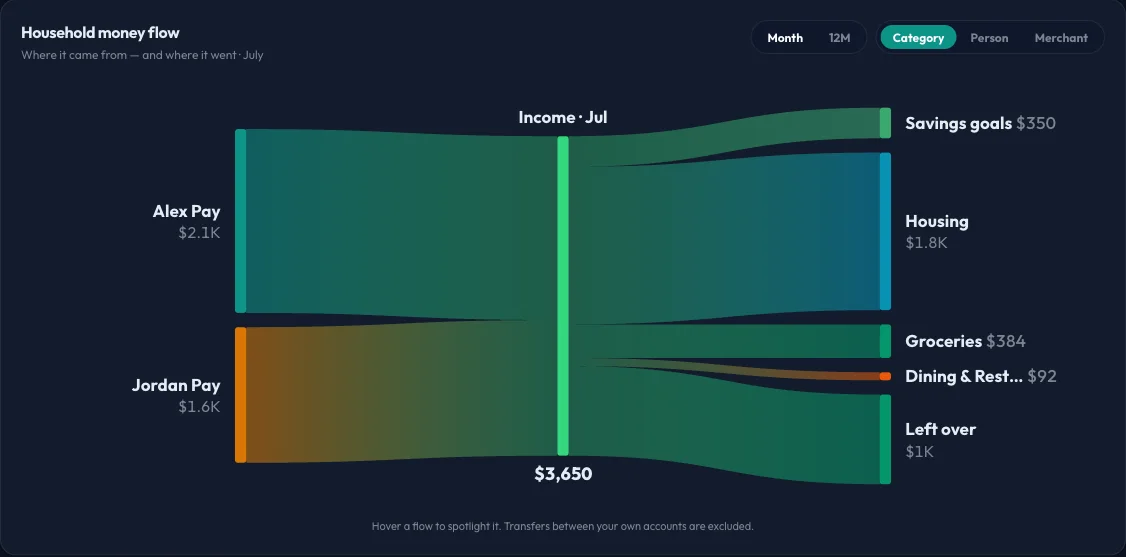
Household money flow
Watch a month of money move.
Income on the left, life on the right. BudgetPilot draws your household’s cash as a living flow — group it by category to see what eats the paycheck, or by person to see who’s spending what. Transfers between your own accounts are excluded automatically.
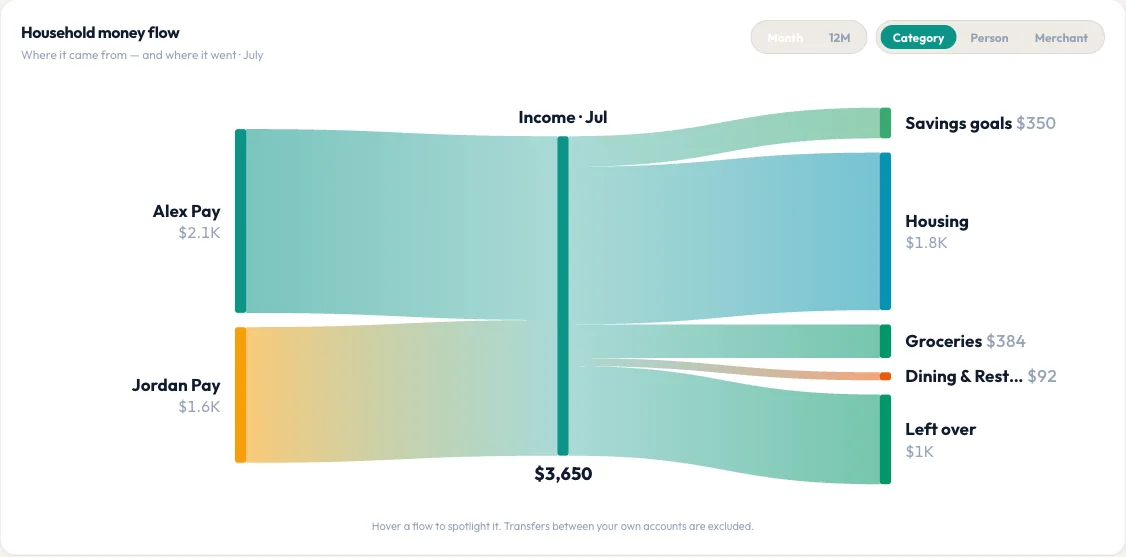
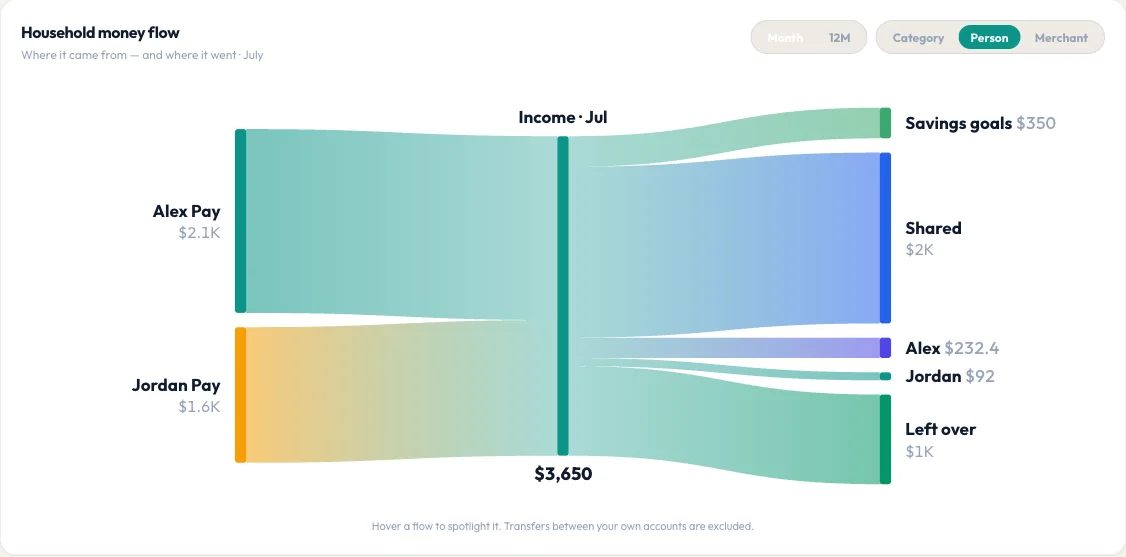
One month of household money: where it came from, and where it went.
Real screens from BudgetPilot Web, shown with demo household data.
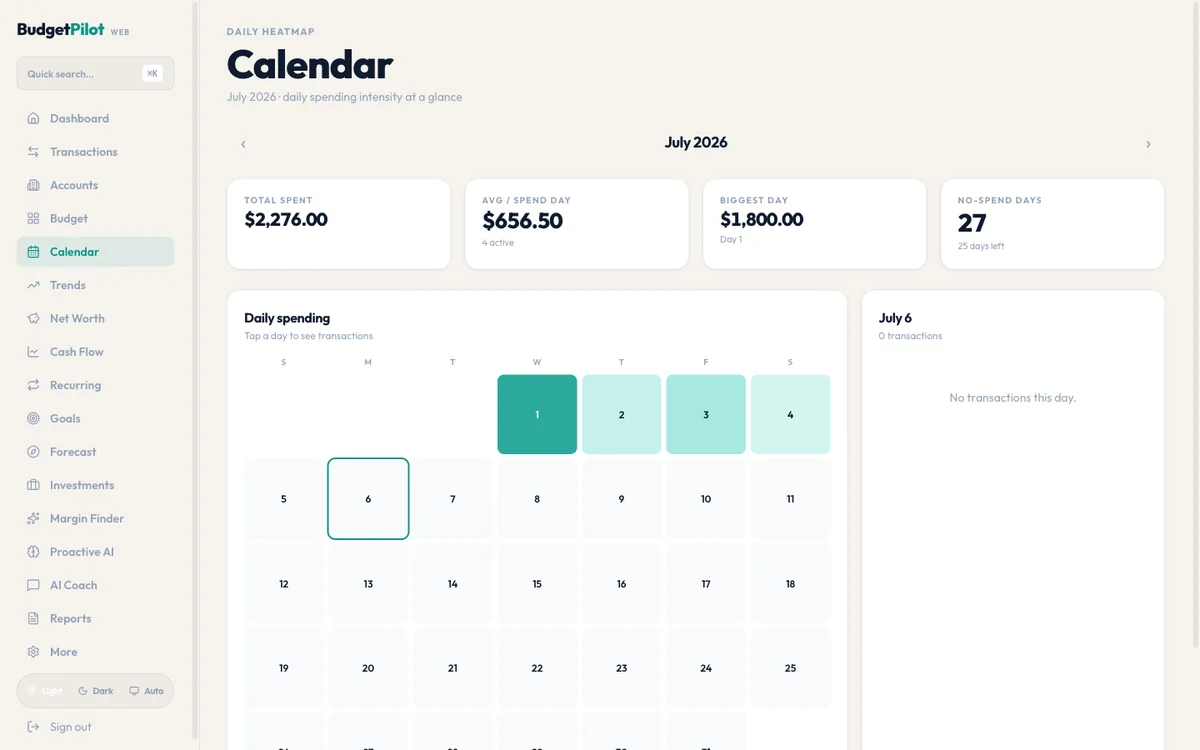
Spending calendar
A calendar that shows where the month went.
Every day is shaded by how much you spent — heavy days glow, quiet days stay pale. Tap any square to see that day's transactions.
- Daily heatmap: spending intensity at a glance
- Total spent, average per spend-day, and your biggest day
- No-spend days counted — watching that number climb gets addictive
Plan vs. actual
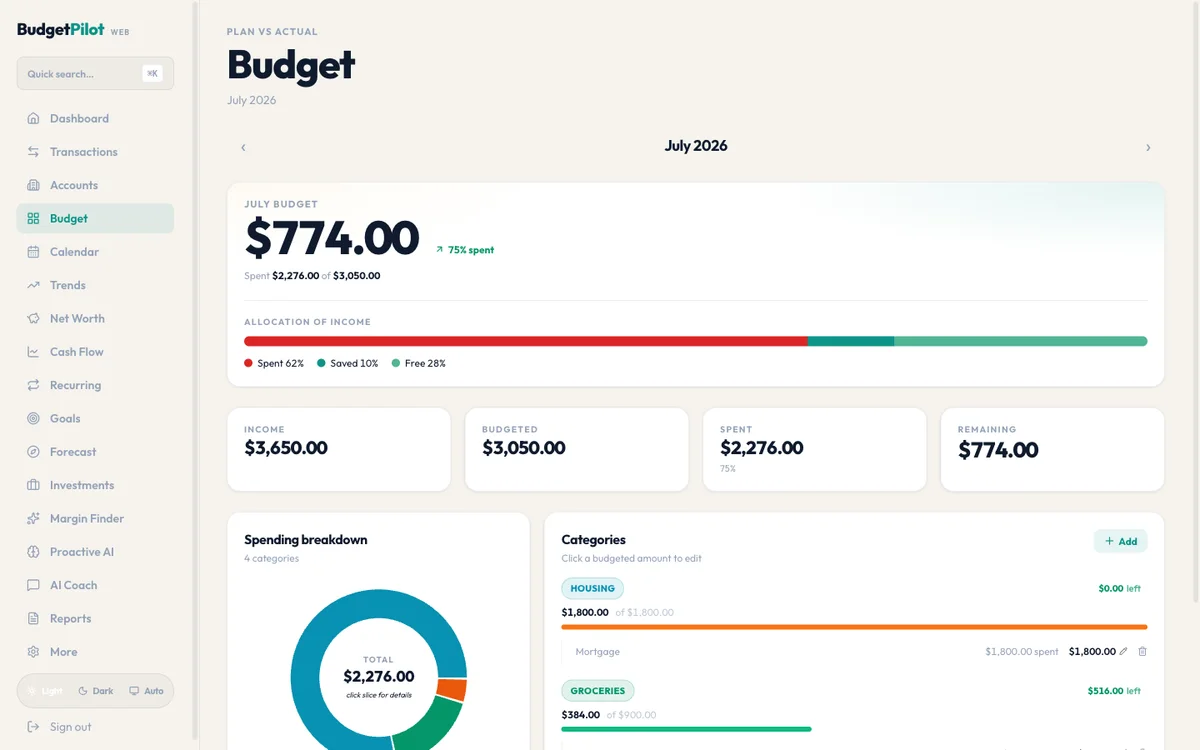
A budget that answers one question: how much is left?
Your remaining number sits front and center, with an allocation bar splitting income into spent, saved, and free. Categories underneath show exactly what's left in each envelope.
- One glance: income, budgeted, spent, remaining
- Allocation of income: spent vs saved vs free, in one bar
- Built for military pay rhythms — mid-month and end-of-month deposits, PCS months, the works
Transactions
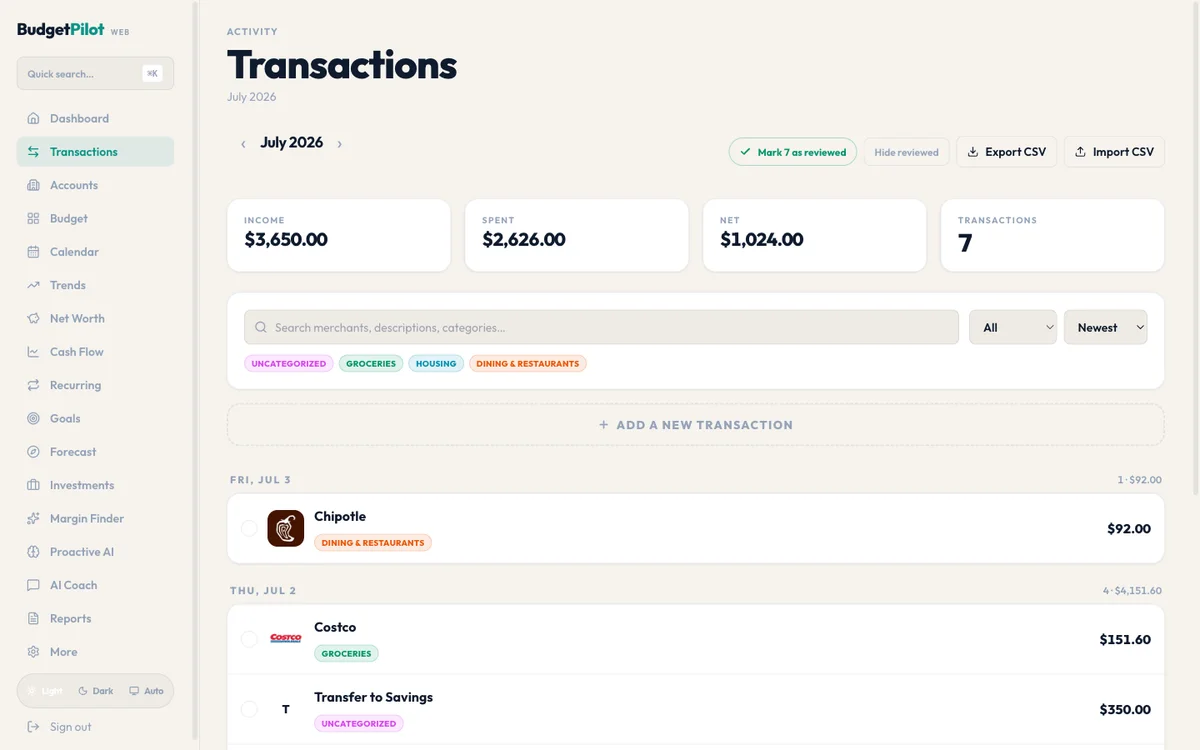
Transactions that basically clean themselves.
Bank imports land already categorized with merchant logos. Review new activity with one tap, search everything, and move data in or out as CSV whenever you want.
- Auto-categorized imports with recognizable merchant logos
- Mark-as-reviewed workflow so nothing slips past you
- CSV import and export — your data is never locked in
Built by a military family, for lumpy military pay.
Mid-month and end-of-month deposits, BAH, special pays, a PCS that turns one month upside down — BudgetPilot’s forecasting and alerts were designed around exactly that rhythm. It works for any household, but it was born in one that PCSes.
What makes it different
Three things most budget apps don’t do.
Warns you before you overspend
Predictive spending alerts fire on the direction your budget is heading, not after you've already blown past it. "You've used 80% of Dining with 12 days left." That kind of thing.
AI Financial Coach
Ask anything — "Can I afford this?", "Where am I wasting money?", "Save $5,000 by December." Powered by Claude with access to your real budget data.
Spending Pace Graph
Real-time chart comparing actual spending to your ideal pace. Free-to-spend number front and center, so you always know where you stand today.
Everything inside
A complete personal-finance toolkit in one app.
Budgeting, bank sync, forecasting, debt planning, and a built-in AI coach — designed to work together, not as separate tools.
Zero-Dollar Budgeting
Assign every dollar a purpose across expenses, savings, and investments. Switch between Planned, Spent, and Remaining views.
Connect Your Bank
Link accounts via Plaid. Imports and categorizes transactions using 10,000+ merchant rules plus AI. Checking, savings, credit, loans, investments.
Receipt Scanner + Quick Add
Snap a receipt — AI reads merchant, items, and total automatically. Or type naturally: "Spent $45 at Costco" and it's done.
Bill Countdown
Never miss a payment. See bills due this week, track paid vs upcoming, get reminders.
Cash Flow Forecasting
Project your balance 30, 60, or 90 days ahead. Spot shortfalls before they happen.
Transaction Splitting
Split a $150 Costco trip into Groceries and Household with one tap.
Net Worth Tracker
All accounts in one dashboard. One number: your total net worth, updated live.
AI Monthly Summary
Personalized report with wins, areas to watch, and an actionable tip. Email it with one tap.
Smart Categorization
10,000+ merchants recognized automatically. AI learns your corrections and applies them going forward.
Subscription Tracker
Detect recurring charges, see total monthly cost, and flag unused subscriptions.
Debt Payoff Planner
Compare snowball vs avalanche side by side. See your debt-free date and interest savings.
Financial Calculators
Compound interest, loan, mortgage, paycheck estimator (2026 IRS brackets, all 50 states), retirement, emergency fund.
Shared Family Budgets
Invite your partner with a 6-digit code. Share one budget and stay on the same financial page.
Money Radar
Flags unusual charges, duplicate transactions, and subscription price increases.
Savings Challenges
No-Spend Weekend, Coffee Detox, 52-Week Savings, and more. Track and mark complete.
Export + Tax Prep
Monthly or annual reports. Export as CSV for spreadsheets or tax prep.
Dark Mode + Biometrics
Full dark theme. Face ID, Touch ID, fingerprint unlock. Sign in with Apple and Google supported.
Bank-grade security
Plaid read-only account access. End-to-end encryption. Data never sold.
Pricing
Simple and up front.
Monthly
Free for 3 months (new subscribers), then $8.99/month. Billed monthly · cancel anytime.
Annual
Just $19.99 for your entire first year (new subscribers), then $49.99/year — about $4.17/month.
BudgetPilot Premium — one tier, every feature, on either plan · auto-renewing · cancel anytime
Premium unlocks:
- — AI Financial Coach with unlimited chat
- — Unlimited bank account connections via Plaid
- — Automatic transaction import and smart categorization
- — Receipt scanner with AI extraction
- — Predictive overspend alerts and bill countdowns
- — 30 / 60 / 90-day cash flow forecasting
- — Net worth tracking across all accounts
- — Shared budgets for couples
- — AI monthly summary reports
- — Subscription tracker, debt payoff planner, and financial calculators
- — CSV export for tax prep
- — Face ID / Touch ID security
Payment is charged to your Apple ID or Google Play account at confirmation of purchase. Monthly: first 3 months free for new subscribers, then renews at $8.99/month. Annual: $19.99 for the first year for new subscribers, then renews at $49.99/year. Subscriptions renew automatically unless auto-renew is turned off at least 24 hours before the end of the current period. Manage or cancel in your Apple ID Account Settings or Google Play subscriptions. Any unused portion of a free trial is forfeited when a paid subscription begins.
FAQ
Straight answers.
Is there a free trial?
Yes — new subscribers get their first 3 months free on the monthly plan, then it's $8.99/month. Prefer annual? The first year is $19.99, then $49.99/year — over 50% off the monthly price. You can cancel anytime from your Apple ID or Google Play subscription settings and keep using the app through the end of the billing period.
Which banks does BudgetPilot support?
Any institution Plaid supports — which is 12,000+ banks, credit unions, and brokerages in the U.S. Link accounts in under a minute. BudgetPilot never sees your login credentials; Plaid handles authentication securely.
What does "AI Financial Coach" actually do?
It reads your real budget and transactions (with your permission) and answers natural-language questions like "Can I afford this trip?" or "What categories am I overspending in?" Built on Claude — the same AI family used in serious enterprise tools.
Can I use BudgetPilot with a partner?
Yes. Shared Family Budgets let you invite your partner with a 6-digit code so both of you see and act on the same budget, accounts, and goals. No shared passwords required.
Is there a web version?
Yes — BudgetPilot Web runs in any browser at web.gobudgetpilot.com with the same account as the mobile app. The screenshots on this page are real screens from it: household money flow, the spending calendar, budget, and transactions all sync live between web and phone.
Is my data secure?
Yes. Account linking is read-only via Plaid — the same infrastructure Mint, Venmo, and Robinhood use. Data is encrypted end-to-end, protected by Face ID / Touch ID, and never sold to third parties.
Is BudgetPilot on Android?
Yes — BudgetPilot is live on Google Play. Same features and the same offers as the iPhone version: 3 months free on the monthly plan ($8.99/month after) or $19.99 for the first year on annual (then $49.99/year). Bank linking, AI coach, predictive alerts, and shared budgets all work cross-platform.
How is this related to Military Toolkit?
Same team. BudgetPilot is a general-purpose personal finance app that works for anyone, but the team behind it also built Military Toolkit — a free calculator suite for service members. Military families tend to have lumpy pay, which is part of why we care about forecasting and predictive alerts.
Ready
Take command of your money.
3 months free, then $8.99/month — or $19.99 for your first year (then $49.99/year). Cancel anytime. One account across iPhone, Android, and the web.
Continue in the browser instead